How to Hard Reset on Samsung SM-G3819D?
Make sure you turned off your phone. Hold down the Power key, the Volume Up key and the Home Button for a while. Wait until the Samsung or Android logo appears. Release all the buttons. Now, you'll see...

Make sure you turned off your phone. Hold down the Power key, the Volume Up key and the Home Button for a while. Wait until the Samsung or Android logo appears. Release all the buttons. Now, you'll see...

The device must be on. Go to the "Settings". In Settings choose "Backup & Reset". After that, go for "Factory data reset". Press "Reset device" to finish...

First, download to your PC: Odin3 latest version, Firmware, Samsung Kies, and Samsung Drivers: Samsung Kies Odin3 latest version Samsung Drivers With the phone turned off press and hold the Volume down key, the...

The first is :*#7353*#. Use this code to open the Quick Test menu that allows you to test different options of your device. The second is :*#0*#. Use this code to enter the General Test Mode where you can test...

Turn on your device and open "Settings". In Settings select "About Phone". Click on "Build number" seven times and go back to "Settings". Finally, select Developer...
The device must be switched on. Choose what you want to capture. Then press the Power key and the Volume down button at one time. Great! Now you have a new screenshot.
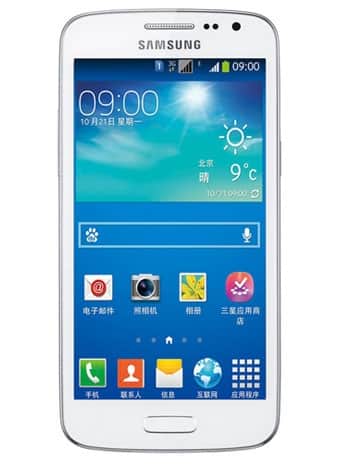
| Model and Features | |
| Model | Samsung SM-G3819D |
| Series | Galaxy Win Pro |
| Release Date | December, 2013 |
| Body Depth | 9.7 mm (0.38 in) |
| Body Dimensions | 132.7 x 66.5 mm (5.22 x 2.62 in) |
| Body Weight | 139 g (4.90 oz) |
| OS | Android Jelly Bean 4.1.2 |
| Hardware | |
| CPU | 1.2GHz |
| CPU Cores | Quad-core |
| RAM | 1GB |
| Internal Memory | 4GB |
| External Memory | microSD, up to 32 GB (dedicated slot) |
| Network and Data | |
| SIM | 1 Micro-SIM |
| 2G bands | GSM 850/900/1800/1900MHz |
| 3G bands | - |
| 4G bands | - |
| 5G bands | - |
| Technology Data | GPRS/EDGE |
| Display | |
| Screen size | 4.5 inches, (~63.3% screen-to-body ratio) |
| Type | capacitive touchscreen |
| Resolution | 540 x 960 pixels, (~245 ppi density) |
| Colors | 16M colors |
| Battery and Keyboard | |
| Battery | Removable Li-Ion 2100 mAh |
| Physical keyboard | - |
| Interfaces | |
| Audio output | 3.5mm jack |
| Bluetooth | version 3.1, A2DP |
| DLNA | - |
| GPS | Yes, with A-GPS, GLONASS |
| Infrared port | - |
| NFC | - |
| USB | microUSB 2.0 |
| WLAN | Wi-Fi 802.11 b/g/n, Wi-Fi Direct, hotspot |
Make sure you turned off your phone. Hold down the Power key, the Volume Up key and the Home Button for a while. Wait until the Samsung or...
The device must be on. Go to the "Settings". In Settings choose "Backup & Reset". After that, go for "Factory...
First, download to your PC: Odin3 latest version, Firmware, Samsung Kies, and Samsung Drivers: Samsung Kies Odin3 latest version Samsung Drivers With...
The first is :*#7353*#. Use this code to open the Quick Test menu that allows you to test different options of your device. The second is...
Turn on your device and open "Settings". In Settings select "About Phone". Click on "Build number" seven...
0Comments
Log into post a comment.