How to change language on Samsung SM-R750A?
Open "Settings". Now, choose "Language and keyboard" Lastly, tap on "Language". Great! You've changed the language.

Open "Settings". Now, choose "Language and keyboard" Lastly, tap on "Language". Great! You've changed the language.
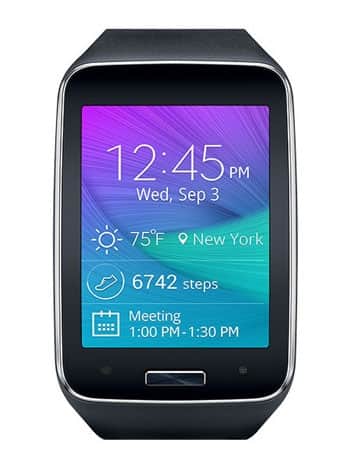
| Model and Features | |
| Model | Samsung SM-R750A |
| Series | Gear S |
| Release Date | October, 2014 |
| Body Depth | 12.5 mm (0.49 in) |
| Body Dimensions | 39.9 x 58.1 mm (1.57 x 2.29 in) |
| Body Weight | 67 g (2.35 oz) |
| OS | Tizen 2.2.1.2 |
| Hardware | |
| CPU | 1000MHz ARM Cortex -A9 |
| CPU Cores | Dual-core |
| RAM | 512MB |
| Internal Memory | 4GB |
| External Memory | - |
| Network and Data | |
| SIM | 1 Nano-SIM |
| 2G bands | GSM 900/1800MHz |
| 3G bands | UMTS 850/1900MHz |
| 4G bands | No |
| 5G bands | - |
| Technology Data | GPRS/EDGE |
| Display | |
| Screen size | 2.0 inches (~53.4% screen-to-body ratio) |
| Type | Super AMOLED |
| Resolution | 360 x 480 pixels (~300 ppi pixel density) |
| Colors | 16M colors |
| Battery and Keyboard | |
| Battery | Non Removable Li-Ion 300 mAh |
| Physical keyboard | - |
| Interfaces | |
| Audio output | - |
| Bluetooth | version 4.1, A2DP, AVRCP, HFP, HSP |
| DLNA | - |
| GPS | Yes, A-GPS, GLONASS, Geotagging, QuickGPS |
| Infrared port | Yes |
| NFC | - |
| USB | microUSB 2.0, USB Host, USB power supply |
| WLAN | Wi-Fi 802.11 b/g/n |
Open "Settings". Now, choose "Language and keyboard" Lastly, tap on "Language". Great! You've changed the language.
0Comments
Log into post a comment.