How to Factory Reset through menu on Samsung SGH-I827?
The device must be on. Go to the "Settings". In Settings choose "Backup & Reset". After that, go for "Factory data reset". Press "Reset device" to finish...
The device must be on. Go to the "Settings". In Settings choose "Backup & Reset". After that, go for "Factory data reset". Press "Reset device" to finish...

Turn on your device and open "Settings". In Settings select "About Phone". Click on "Build number" seven times and go back to "Settings". Finally, select Developer...
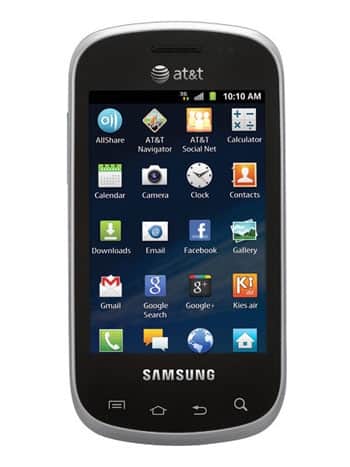
| Model and Features | |
| Model | Samsung SGH-I827 |
| Series | Galaxy Appeal |
| Release Date | June 2012 |
| Body Depth | 14.2 mm (0.56 in) |
| Body Dimensions | 112 x 57.7 mm (4.41 x 2.27 in) |
| Body Weight | 122 g (4.3 oz) |
| OS | Android 2.3 (Gingerbread) |
| Hardware | |
| CPU | 800MHz Cortex -A5, Qualcomm MSM7225A Snapdragon S1 |
| CPU Cores | Single-core |
| RAM | 512MB |
| Internal Memory | 4GB |
| External Memory | microSD, up to 32 GB (dedicated slot) |
| Network and Data | |
| SIM | 1 Mini-SIM |
| 2G bands | GSM 850/900/1800/1900MHz |
| 3G bands | HSDPA 850/1900/2100MHz |
| 4G bands | - |
| 5G bands | - |
| Technology Data | GPRS/EDGE |
| Display | |
| Screen size | 3.2 inches (~47.2% screen-to-body ratio) |
| Type | TFT capacitive touchscreen |
| Resolution | 320 x 480 pixels (~180 ppi pixel density) |
| Colors | 262K colors |
| Battery and Keyboard | |
| Battery | Removable Li-Ion 1300 mAh |
| Physical keyboard | QWERTY |
| Interfaces | |
| Audio output | 3.5mm jack |
| Bluetooth | version 3.1, A2DP, aptx |
| DLNA | - |
| GPS | Yes, with A-GPS |
| Infrared port | - |
| NFC | - |
| USB | microUSB 2.0 (MHL TV-out), USB Host |
| WLAN | Wi-Fi 802.11 b/g/n, hotspot |
The device must be on. Go to the "Settings". In Settings choose "Backup & Reset". After that, go for "Factory...
Turn on your device and open "Settings". In Settings select "About Phone". Click on "Build number" seven...
0Comments
Log into post a comment.