How to Factory Reset through code on Samsung SGH-G400L?
Turn on your phone. Enter the following code: *2767*3855#. Press the Call button to finish "data reset". After a Factory reset through code, your phone data will be deleted.
Turn on your phone. Enter the following code: *2767*3855#. Press the Call button to finish "data reset". After a Factory reset through code, your phone data will be deleted.
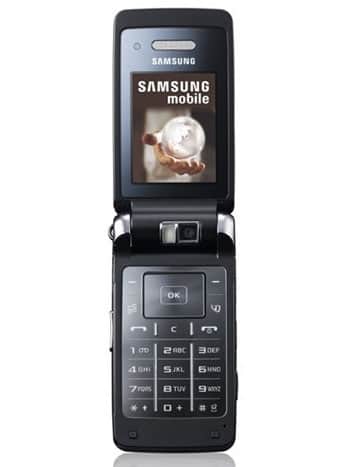
| Model and Features | |
| Model | Samsung SGH-G400L |
| Series | Soul |
| Release Date | March, 2008 |
| Body Depth | 15.2 mm (0.60 in) |
| Body Dimensions | 102.8 x 51.5 mm (4.05 x 2.03 in) |
| Body Weight | 107.8 g (3.77 oz) |
| OS | - |
| Hardware | |
| CPU | - |
| CPU Cores | - |
| RAM | - |
| Internal Memory | 120MB |
| External Memory | microSD, up to 1 GB (dedicated slot) |
| Network and Data | |
| SIM | 1 Mini-SIM |
| 2G bands | GSM 900/1800/1900MHz |
| 3G bands | HSDPA 2100MHz |
| 4G bands | - |
| 5G bands | - |
| Technology Data | GPRS |
| Display | |
| Screen size | 2.2 inches, (~28.3% screen-to-body ratio) |
| Type | TFT |
| Resolution | 240 x 320 pixels, (~182 ppi density) |
| Colors | 256K colors |
| Battery and Keyboard | |
| Battery | Removable Li-Ion 880 mAh |
| Physical keyboard | Yes |
| Interfaces | |
| Audio output | - |
| Bluetooth | version 2.0, A2DP |
| DLNA | - |
| GPS | - |
| Infrared port | - |
| NFC | - |
| USB | USB 2.0 |
| WLAN | - |
Turn on your phone. Enter the following code: *2767*3855#. Press the Call button to finish "data reset". After a Factory reset...
0Comments
Log into post a comment.