How to Factory Reset through menu on LG US760?
Go to the Main Menu. Select "Settings". In Settings touch "General". Next, select "Backup & Reset". Then, tap "Reset Phone". Tap "Erase...

Go to the Main Menu. Select "Settings". In Settings touch "General". Next, select "Backup & Reset". Then, tap "Reset Phone". Tap "Erase...

The device must be on. Go to "Settings" and choose "General". Go for "Language & input". Finally, select "Language". That's all! The...
Turn on your device. In Settings choose "General". Now select "About phone". Now tap "Software info". Tap "Build number" seven times and return to...
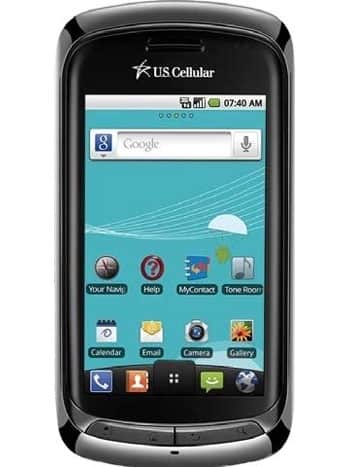
| Model and Features | |
| Model | LG US760 |
| Series | Genesis |
| Release Date | June, 2011 |
| Body Depth | 17 mm (0.67 in) |
| Body Dimensions | 62 x 120 mm (2.44 x 4.72 in) |
| Body Weight | 170 g (6.00 oz) |
| OS | Android 2.2 (Froyo) |
| Hardware | |
| CPU | 1000 MHz Scorpion |
| CPU Cores | Single-core |
| RAM | 512MB |
| Internal Memory | 430MB |
| External Memory | microSD, microSDHC, TransFlash up to 16 GB |
| Network and Data | |
| SIM | 1 Mini-SIM |
| 2G bands | CDMA 800/1900 MHz |
| 3G bands | CDMA 800/1900 MHz |
| 4G bands | - |
| 5G bands | - |
| Technology Data | cdmaOne, CDMA2000 1x, CDMA2000 1xEv-DO, CDMA2000 1xEv-DO Rev A |
| Display | |
| Screen size | 3.5 in (~47% screen-to-body ratio)/3.2 in |
| Type | TN-TFT LCD |
| Resolution | 480 x 800 pixels (~267 ppi pixel density)/480 x 800 pixels |
| Colors | 16M colors |
| Battery and Keyboard | |
| Battery | Removable Li-Ion 1500 mAh |
| Physical keyboard | Yes |
| Interfaces | |
| Audio output | 3.5mm jack |
| Bluetooth | version 2.1, A2DP, EDR |
| DLNA | Yes |
| GPS | Yes, with A-GPS, Geotagging, QuickGPS |
| Infrared port | No |
| NFC | No |
| USB | microUSB 2.0 , USB charging |
| WLAN | Wi-Fi802.11b/g, Wi-Fi hotspot |
Go to the Main Menu. Select "Settings". In Settings touch "General". Next, select "Backup & Reset". Then,...
The device must be on. Go to "Settings" and choose "General". Go for "Language & input". Finally,...
Turn on your device. In Settings choose "General". Now select "About phone". Now tap "Software info". Tap...
0Comments
Log into post a comment.